Victron Energy
Victron Digital Multi Control GX
Victron Digital Multi Control GX
Couldn't load pickup availability
Take control of your Victron inverter/charger without opening an app, connecting a computer, or accessing the inverter itself. The Victron Digital Multi Control GX provides convenient, hands-on control of compatible MultiPlus and Quattro inverter/chargers from wherever you install the panel.
Turn your inverter ON, OFF, or select Charger Only mode with a simple switch. Even better, the built-in rotary dial lets you adjust your AC input current limit in seconds, making it incredibly convenient when switching between campground hookups, generators, and standard household outlets.
Whether you're travelling in an RV, powering an off-grid cabin, or occasionally connecting through a 15A extension cord, the Digital Multi Control makes it easy to match your inverter's AC input to the available power supply without reprogramming your inverter.
- Instant AC Input Adjustment: Turn the dial to match your available campground hookup, generator, or household electrical supply.
- Help Prevent Tripped Breakers: Quickly reduce the input current limit when connecting to smaller electrical services, including standard 15A outlets.
- Remote ON/OFF Control: Switch your inverter/charger ON, OFF, or into Charger Only mode without accessing the inverter.
- No Reprogramming Required: Make everyday shore-power adjustments in seconds, without a laptop or configuration software.
- Easy-to-Read Status: Digital current-limit display and LED indicators show charging, inverter operation, and warnings.
- Automatic Night Dimming: A built-in ambient light sensor automatically dims the LEDs in darker surroundings, reducing glare in RVs, cabins, and sleeping areas.
Campgrounds & RV Shore Power: Pull into a campground with a 30A hookup? Adjust the AC input limit to match the available service. Moving to a site with only a 15A connection? Turn the dial down in seconds without changing your inverter configuration.
Household Outlets & Extension Cords: Connecting your RV or camper to a standard household outlet? Set a conservative current limit to help avoid overloading the circuit, particularly when using an appropriately rated extension cord. This is a huge convenience when dedicated high-current shore power isn't available.
Generators & Off-Grid Cabins: Match your inverter/charger's AC input demand to your generator's available capacity. The MultiPlus or Quattro can automatically reduce battery charging when necessary, helping prevent the generator from becoming overloaded.
Running from a standard household outlet or extension cord? Simply turn the dial to reduce your AC input limit and help prevent tripping breakers. Switching to a larger campground hookup? Adjust it again in seconds. No laptop or reprogramming required!
A straight-through RJ45 UTP cable is required to connect the panel to your Victron inverter/charger. Cable sold separately. Choose a length suitable for your installation.
| Victron Part Number | DMC000200010 |
| Communication Interface | VE.Bus / RJ45 UTP |
| Current Limit Adjustment | Rotary Dial |
| Operating Modes | ON / OFF / Charger Only |
| Display | Digital AC Input Current Limit |
| Status Indicators | 8 LEDs |
| LED Dimming | Automatic (Ambient Light Sensor) |
| Mounting | Panel Mount |
| Connection Cable | RJ45 UTP (Not Included) |
Want a complete touchscreen interface for your Victron system? Pair a Cerbo GX with a GX Touch display to monitor batteries, solar production, AC power, and more from one convenient screen. Cerbo GX required, sold separately.
What should I set my AC input current limit to?
Match the AC input limit to the available electrical service, not simply the maximum capability of your inverter. For extended or continuous operation, a conservative starting point is 80% of the circuit's breaker rating. This helps leave headroom and is consistent with common North American continuous-load sizing practices.
Here are some convenient starting settings for common North American electrical services:
| Available Service | Suggested AC Input Limit |
|---|---|
| 15A Household Outlet | 12A |
| 30A RV / Campground Hookup | 24A |
| 50A Shore Power Service | 40A |
These are general starting recommendations, not universal limits. The appropriate setting depends on the circuit, extension cord, other connected loads, and your inverter's capabilities. A North American 50A RV hookup typically provides two 120V legs, so the setting must also suit your inverter's AC input configuration.
Important: The dial limits current drawn by the inverter/charger; it does not increase the capacity of your electrical supply or guarantee that a breaker won't trip. Some larger Victron inverter/chargers also have minimum selectable input limits above 12A.
Can this help prevent tripping a 15A campground breaker?
Yes! This is one of the biggest benefits of the Digital Multi Control. Instead of leaving your inverter configured for a larger shore-power connection, simply reduce the AC input limit using the rotary dial.
For example, if you're using a dedicated 15A household outlet, setting the limit to 12A can provide useful headroom for extended operation, provided your inverter supports that setting.
When you move to a campground with a larger hookup, turn the dial to the new setting. No computer, programming cable, or software adjustments are needed.
Does adjusting the AC input limit change my battery charging current?
Indirectly, yes. The dial controls the maximum AC current your inverter/charger is permitted to draw from the incoming power supply.
When available AC power is limited, your compatible MultiPlus or Quattro can automatically reduce battery charging to stay within the configured input limit while supplying connected AC loads.
This is particularly useful when charging batteries from smaller generators or campground hookups. The Digital Multi Control does not directly change your battery charger's programmed maximum DC charging current.
Can I turn my MultiPlus or Quattro on and off remotely?
Yes! The panel includes a convenient three-position switch: ON, OFF, and Charger Only.
Mount the Digital Multi Control somewhere convenient inside your RV, cabin, boat, or living area, even when your inverter is installed in an electrical cabinet or battery compartment.
Charger Only mode allows the unit to charge batteries when AC power is available, without automatically switching to inverter operation if that external AC supply is lost.
Is the RJ45 connection cable included?
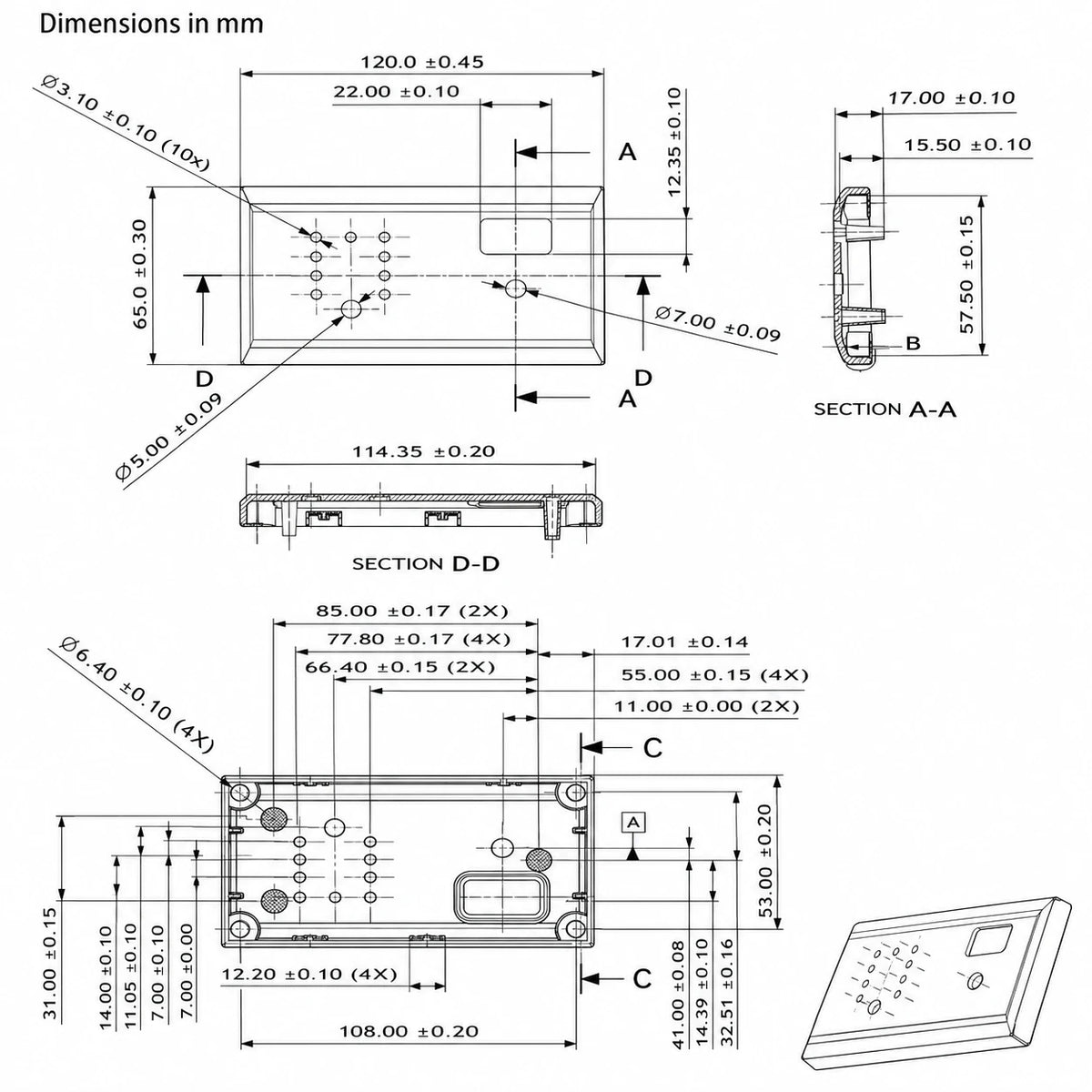
No. The Digital Multi Control GX includes the control panel and four mounting screws, but the connection cable is sold separately.
You'll need a straight-through RJ45 UTP cable to connect the panel to an available VE.Bus communication port on your compatible Victron inverter/charger.
A quality, factory-made Cat5e or Cat6 straight-through network patch cable is generally suitable. Choose a length that reaches from your inverter to the desired control-panel location.
Is the Digital Multi Control difficult to install?
Not usually! For a typical compatible MultiPlus installation, simply mount the panel in a convenient location and connect it to the inverter/charger using a straight-through RJ45 UTP cable.
In most basic installations, the panel begins communicating with the inverter/charger without requiring additional programming. This makes it a convenient upgrade for RVs, cabins, and other systems where the inverter isn't easily accessible.
More complex installations, including certain multi-input, parallel, or multi-phase systems, may require additional configuration. Follow Victron's installation instructions for your specific system.
Which Victron inverter/chargers are compatible?
The Digital Multi Control GX supports compatible Victron inverter/chargers, including the MultiPlus, MultiPlus-II, Quattro, and Quattro-II product families.
It also supports certain MultiCompact, EasySolar, and legacy VE.Bus systems, along with supported parallel and multi-phase inverter configurations.
The available control functions and configuration requirements depend on the connected equipment. Check Victron's compatibility documentation for your particular inverter/charger.
Does the display automatically dim at night?
Yes! The Digital Multi Control GX has a built-in ambient light sensor that automatically adjusts the brightness of its LED indicators.
When the surrounding area becomes darker, the LEDs dim automatically. This is particularly convenient in RVs, boats, cabins, and sleeping areas where bright indicator lights can be distracting.
There's no need to manually change the LED brightness each evening. The panel adjusts it automatically as the ambient lighting changes.
What's the difference between this and a GX Touch display?
The Digital Multi Control is a dedicated remote panel for everyday inverter/charger operation. It's ideal when you primarily want convenient ON/OFF control and quick AC input current adjustments.
A Cerbo GX paired with a GX Touch touchscreen provides much more comprehensive system monitoring. Depending on your connected equipment, you can view battery information, solar production, AC loads, system alarms, and supported control settings.
If you're building a larger Victron installation or want a touchscreen interface for your entire power system, consider the GX Touch 50 or GX Touch 70. A compatible Cerbo GX is required and sold separately.
Share