Victron Energy
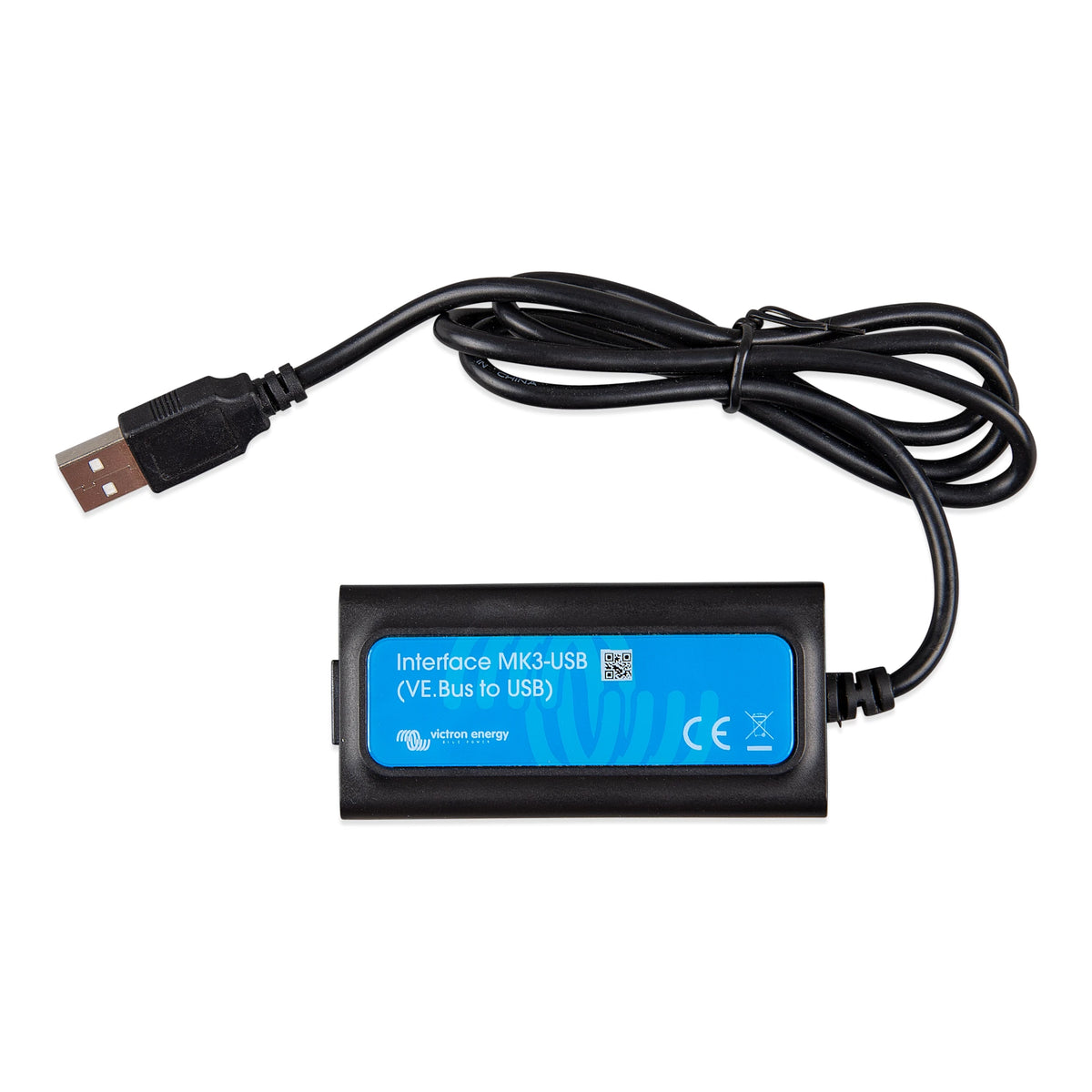
Victron MK3-USB Interface – VE.Bus to USB
Victron MK3-USB Interface – VE.Bus to USB
Couldn't load pickup availability
Victron MK3-USB Interface – VE.Bus to USB
The Victron MK3-USB Interface connects compatible Victron VE.Bus equipment to a computer or supported Android device for configuration, diagnostics and firmware updates using Victron software.
Available with either a USB-A or USB-C connection, it is an essential commissioning and service tool for compatible MultiPlus, MultiPlus-II, Quattro, EasySolar and Phoenix Inverter models equipped with a VE.Bus communication port.
Both versions provide exactly the same functionality. Simply choose the USB connector that fits your laptop or computer.
Why You'll Love It
- Connects compatible Victron VE.Bus products to a computer or supported Android device
- Unlocks inverter, charger and AC-input configuration settings
- Supports firmware updates through VictronConnect
- Provides direct access to operating information and diagnostics
- Compact service tool that can be reused across compatible Victron systems
Configure Your VE.Bus Equipment
The MK3-USB provides direct access to the settings of compatible Victron inverter/chargers and inverters. This makes it possible to properly commission equipment for the connected battery bank, AC source and application.
| Configuration Area | Examples |
|---|---|
| Battery Charger | Charge current, absorption voltage, float voltage, storage voltage and charging profile |
| Inverter | Output voltage, low-battery shutdown, restart voltage, AES mode and Search mode |
| AC Input | Input-current limit, accepted voltage range, frequency range and generator-related settings |
| PowerAssist | Configure how the inverter assists a limited shore-power, utility or generator source |
| System Operation | Remote-control behaviour, programmable relay functions and supported multi-unit configuration |
| Maintenance | Firmware updates, diagnostics and saving or restoring compatible configuration files |
VE.Bus settings directly affect battery charging, inverter operation and AC-source management. Confirm the correct values for your battery, BMS, shore-power connection, generator and electrical system before applying changes.
Victron Configuration Software
VictronConnect is the primary software for connecting to compatible VE.Bus equipment through the MK3-USB. It provides a user-friendly interface for viewing operating information, changing supported settings, saving configurations and performing supported firmware updates.
VEConfigure is available for Windows as part of Victron's VE Configuration Tools. It is used for certain advanced VE.Bus configuration tasks, including specialized system settings and Victron Assistants that may not be available through VictronConnect.
| Victron Software | Primary Uses | Platform |
|---|---|---|
| VictronConnect | Monitoring, supported settings, configuration backups, diagnostics and firmware updates | Windows, macOS and supported Android devices |
| VEConfigure | Advanced VE.Bus settings, specialized configuration and supported Victron Assistants | Windows |
Firmware Updates & Diagnostics
In addition to changing settings, the MK3-USB can be used with VictronConnect to read operating information, diagnose system behaviour and install supported firmware updates.
The direct wired connection is especially useful during system commissioning, troubleshooting or equipment replacement. Configuration files can also be saved as a backup or used when setting up compatible equipment with matching requirements.
A VE.Bus Smart Dongle is convenient for wireless monitoring and basic control, but the MK3-USB provides access to VE.Bus Settings Mode and supported firmware updates. It is the better tool when commissioning or servicing a system.
What You Need to Connect
The MK3-USB connects between your computer or supported Android device and the VE.Bus RJ45 port on the Victron product.
- Victron MK3-USB Interface with the selected USB-A or USB-C connection
- Compatible Victron product with a VE.Bus communication port
- Straight-through RJ45 UTP cable between the interface and VE.Bus product
- Compatible Windows, macOS or Android device
- VictronConnect or the appropriate Victron configuration software
- Power supplied to the connected Victron equipment
A straight-through RJ45 patch cable is required between the MK3-USB interface and the VE.Bus port on the Victron product. Use a quality ethernet patch cable for reliable communication.
We recommend a Cat5e or Cat 6 patch cable
Compatible Victron Products
The MK3-USB works with compatible Victron equipment equipped with a VE.Bus communication port, including:
- Multi and MultiPlus inverter/chargers
- MultiPlus-II inverter/chargers
- MultiGrid inverter/chargers
- Quattro inverter/chargers
- EasySolar and EasySolar-II systems
- EasyPlus systems
- VE.Bus BMS V2
- Phoenix Inverters equipped with VE.Bus
The MK3-USB provides the wired configuration connection needed to confirm battery charging settings, inverter limits, AC-input behaviour and other important operating parameters on compatible MultiPlus-II models.
MK3-USB vs. VE.Bus Smart Dongle
| Feature | MK3-USB | VE.Bus Smart Dongle |
|---|---|---|
| Connection | Wired USB-A or USB-C | Bluetooth |
| Status Monitoring | Yes, while connected | Yes |
| On/Off/Charger-Only Control | Yes, while connected | Yes |
| AC Input-Current Adjustment | Yes | Yes |
| VE.Bus Settings Mode | Yes | No |
| Firmware Updates | Yes | No |
| Best Use | Commissioning, configuration and service | Everyday wireless monitoring and basic control |
Computer & Mobile Compatibility
| Device | Compatibility |
|---|---|
| Windows Computer | Compatible with VictronConnect and supported VE.Bus configuration tools |
| macOS Computer | Compatible with supported VictronConnect configuration and update functions |
| Android Phone or Tablet | Compatible when the device supports USB host or OTG operation and runs VictronConnect |
| Apple iPhone or iPad | Not supported for MK3 configuration through VictronConnect |
Product Specifications
| Variant | Victron Part Number | EAN / UPC |
|---|---|---|
| MK3-USB-C – VE.Bus to USB-C | ASS030140030 | 8719076057994 |
| MK3-USB – VE.Bus to USB-A | ASS030140000 | 8719076019435 |
| Specification | Value |
|---|---|
| Product Family | Victron Interface MK3-USB |
| Interface Type | VE.Bus to USB |
| Available Computer Connections | USB-A or USB-C |
| Victron Equipment Connection | RJ45 VE.Bus |
| Configuration Support | Yes |
| Firmware Update Support | Yes, for compatible Victron equipment |
| Status and Diagnostic Data | Yes, while connected |
| Bluetooth | No |
| VE.Direct Compatibility | No; designed for VE.Bus equipment |
| Supported Platforms | Windows, macOS and compatible Android devices |
| iPhone and iPad Configuration | Not supported |
| External Power Supply | Not required for the interface |
| Additional Cable Required | Straight-through RJ45 UTP cable, sold separately |
| Approximate Packaged Dimensions (L × W × H) | 125 × 85 × 35mm (4.9 × 3.3 × 1.4in) |
| Approximate Packaged Weight | 0.09kg (0.20lb) |
| Warranty | 5 Year |
Specifications are believed to be accurate at the time of publication but may change without notice. While we make every effort to keep product information current, Sapphire Energy cannot guarantee all specifications are complete, error-free or up to date. Please refer to the manufacturer’s documentation if a particular specification is critical to your application. Contact us for help!
Frequently Asked Questions
What does the MK3-USB Interface do?
It provides a direct communication connection between a compatible Victron VE.Bus product and a computer or supported Android device.
With the appropriate Victron software, it can be used to review operating information, change supported settings, diagnose system behaviour and install firmware updates.
Should I choose USB-A or USB-C?
Choose the version that matches the device you plan to use. USB-C is generally the best choice for newer computers and compatible Android devices, while USB-A is convenient for traditional laptops, desktops and service computers.
Both versions provide the same VE.Bus configuration, diagnostic and firmware-update capabilities.
What is the difference between ASS030140000 and ASS030140030?
ASS030140000 connects to a computer through a traditional USB-A port. ASS030140030 uses the newer USB-C connection found on many modern computers and compatible Android devices.
Both versions provide the same VE.Bus configuration, diagnostic and firmware-update capabilities. The only meaningful difference is the USB connector, so choose the version that best matches the device you plan to use.
What Victron software do I need?
VictronConnect is the primary software for connecting through the MK3-USB. It can be used on supported Windows, macOS and Android devices to view operating information, change compatible VE.Bus settings, save configurations and perform supported firmware updates.
VEConfigure is available for Windows as part of Victron's VE Configuration Tools. It is used for advanced VE.Bus configuration tasks, including certain Assistants and specialized system settings that may not be available through VictronConnect.
Both programs are available as free downloads from Victron Energy. The appropriate software depends on the connected equipment, its firmware and the settings that need to be changed.
Is the RJ45 VE.Bus cable included?
No. A straight-through RJ45 UTP cable is required between the MK3-USB interface and the VE.Bus port on the Victron product.
The cable length can be selected to suit the installation and is sold separately.
Can I use an ordinary network cable?
A quality factory-manufactured straight-through RJ45 UTP patch cable can normally be used. Avoid crossover cables and poorly crimped cables, which may cause communication problems.
Although the connector resembles an Ethernet network connection, VE.Bus equipment should not be connected directly to a router, network switch or Ethernet port.
Can I use a USB adapter?
Yes, a suitable USB-A to USB-C or USB-C to USB-A adapter may be used when necessary. The adapter must support data communication rather than charging only.
For Android devices, the phone or tablet must also support USB host or OTG operation.
Can I use it with an Android phone or tablet?
Yes, when the Android device supports USB host or OTG operation and can run VictronConnect.
The USB-C version is normally the most convenient choice for modern Android devices. The USB-A version may require a suitable OTG adapter.
Can I use it with an iPhone or iPad?
No. MK3 configuration through VictronConnect is not supported on Apple iPhone or iPad devices.
Use a compatible Windows or macOS computer, or a supported Android device, for a wired MK3 connection.
Does it work with VE.Direct products?
No. The MK3-USB is specifically designed for Victron products equipped with a VE.Bus communication port.
SmartSolar and BlueSolar charge controllers, SmartShunts and other products that use VE.Direct require a compatible VE.Direct interface instead.
Do I need this if I have a VE.Bus Smart Dongle?
The two accessories serve different purposes. A VE.Bus Smart Dongle is intended primarily for convenient Bluetooth monitoring, mode control and AC input-current adjustment.
The MK3-USB provides wired access to supported VE.Bus settings and firmware updates, making it the more capable tool for commissioning, configuration and service work.
Do I need this if I have a Cerbo GX?
A Cerbo GX provides permanent system monitoring, control and VRM connectivity. Many settings can also be managed remotely through supported Victron tools.
The MK3-USB remains useful as a direct local service connection for commissioning, diagnostics, supported firmware work and situations where remote access is unavailable.
Can the MK3-USB remain connected permanently?
It can remain connected during configuration, diagnostics or servicing, but it is primarily a commissioning and service tool rather than a permanent monitoring solution.
For ongoing system monitoring and remote access, a Cerbo GX or another compatible GX device is generally the better choice.
Can you help configure my MultiPlus or Quattro?
Yes. Contact us with the exact Victron model, battery specifications, BMS information, available AC source and intended loads.
We can help identify the settings and additional equipment that should be considered for your system.
Can you special-order other Victron products?
Yes. We may be able to special-order Victron products that are not currently listed on our website, including alternate interfaces, communication cables, monitoring equipment and system accessories.
Contact us with the Victron model or part number you need and we will confirm availability, pricing and estimated lead time.
What warranty does this product include?
The Victron MK3-USB Interface is backed by Victron Energy's 5-year limited warranty.
If you need troubleshooting or warranty assistance, Sapphire Energy will work with you throughout the process.
Send us the model or part number of your Victron equipment and tell us whether you need configuration, Bluetooth monitoring or permanent remote system access. We can help you choose the correct interface, USB connection and communication cable.
Share