Victron Energy
Victron Cerbo GX MK2 System Monitoring Hub
Victron Cerbo GX MK2 System Monitoring Hub
Couldn't load pickup availability
Complete Monitoring & Control for Your Victron System
The Victron Cerbo GX MK2 brings your entire electrical system together in one powerful communication and monitoring hub. Connect compatible inverter/chargers, solar charge controllers, battery monitors, managed lithium batteries, DC-DC chargers, tank sensors and other equipment to see how the complete system is performing from one central interface.
Monitor locally through a phone, tablet, web browser or optional GX Touch display—or connect the Cerbo GX MK2 to the internet for remote monitoring and control through Victron's free VRM Portal. View live power flow, review historical data, receive configurable alarms and access many system settings from virtually anywhere.
The updated MK2 model provides two independently configurable VE.Can interfaces, three fully functional USB host ports and pulse-counting capability on its four digital inputs. These improvements make it particularly well suited to advanced RV, marine, off-grid and professional energy systems.
Why You'll Love It
- Monitor your complete Victron system from one interface
- Free remote monitoring and control through the Victron VRM Portal
- Optional GX Touch 50 or GX Touch 70 local touchscreen
- Three VE.Direct ports and one isolated VE.Bus interface
- Two independently configurable VE.Can interfaces
- Built-in WiFi, Ethernet and Bluetooth connectivity
- Four tank-level, four temperature and four digital inputs
- Two programmable relays, including generator start/stop support
The Cerbo GX MK2 collects information from compatible Victron equipment and presents it as one coordinated system. Quickly check battery state of charge, solar production, AC loads, generator status, tank levels, temperatures and other important operating data.
Remote Monitoring with the Free VRM Portal
Connect the Cerbo GX MK2 to the internet through its Ethernet port, built-in 2.4GHz WiFi or compatible external networking equipment to unlock Victron Remote Management. The VRM Portal is free and can be accessed through a web browser or the VRM mobile app.

- View live system status and power flow
- Review detailed historical charts and energy data
- Create customizable alarms and notifications
- Access the Remote Console from anywhere
- Remotely change supported system settings
- Perform supported remote firmware updates
- Monitor one system or manage multiple installations
The Cerbo GX MK2 does not include a cellular modem or internet service. Remote VRM access requires an available internet connection through Ethernet, WiFi, a compatible cellular router or another supported networking solution.
Add an Optional GX Touch Display

For a clean, dedicated local control panel, pair the Cerbo GX MK2 with an optional GX Touch 50 or GX Touch 70. These slim touchscreen displays provide an immediate overview of the system and quick access to settings without requiring a phone or computer.
The GX Touch connects directly to the Cerbo GX MK2 using its permanently attached two-metre HDMI and USB cable. No separate display power supply or configuration is required.
Choose the compact 5-inch GX Touch 50 where installation space is limited, or the larger 7-inch GX Touch 70 for improved visibility and easier operation.
Flexible Victron System Connectivity
The Cerbo GX MK2 includes an extensive selection of communication ports for integrating Victron and compatible third-party equipment.
| Connection | Typical Use |
| 3 × VE.Direct | SmartSolar controllers, SmartShunts, BMV battery monitors and other compatible VE.Direct products |
| 1 × VE.Bus Interface | Victron MultiPlus, Quattro and compatible VE.Bus inverter/chargers |
| 2 × Configurable VE.Can Interfaces | Managed batteries, Lynx equipment, VE.Can devices, RV-C and compatible marine integrations |
| Ethernet and WiFi | Local network access, internet connectivity and VRM communication |
| 3 × USB Host | GX Touch, VE.Direct USB adapters, supported GPS receivers, storage and other compatible accessories |
| HDMI | GX Touch 50 or GX Touch 70 display connection |
Connection cables and adapters for individual Victron products are generally sold separately. Compatibility and the required cable depend on the equipment being connected.
The Cerbo GX MK2's built-in Bluetooth is primarily used for initial network configuration through VictronConnect. It cannot use Bluetooth to collect operating data directly from SmartSolar controllers or other Victron Smart products.
Those devices must be connected to the GX system through their supported wired interface, such as VE.Direct, VE.Can or VE.Bus.
Dual Configurable VE.Can Interfaces
Unlike the original Cerbo GX, which used one VE.Can interface and one dedicated BMS-Can interface, the Cerbo GX MK2 provides two independently configurable VE.Can interfaces. Each interface has two paralleled RJ45 sockets, providing four CAN communication sockets in total.
Both interfaces can be configured for supported profiles such as VE.Can, BMS-Can, CAN-bus BMS and RV-C. The VE.Can 1 interface is galvanically isolated, making the MK2 especially useful in systems that require two different CAN networks.
The two separate CAN interfaces allow applications such as connecting a compatible managed battery or Lynx Smart BMS on one network while using the other for RV-C, NMEA 2000 or other supported equipment.
Tank, Temperature & Digital Monitoring
Four resistive tank-level inputs allow compatible senders to be incorporated into the GX system. Monitor fresh water, grey water, black water, fuel or other tank levels locally or remotely through VRM.
Four temperature inputs can monitor batteries, equipment compartments or other important locations using compatible Victron temperature sensors. Four configurable digital inputs can monitor suitable open/closed signals such as doors, bilge alarms, fire alarms or other external contacts.
On the MK2 model, the digital inputs also support pulse counting for compatible meters and sensors.
Tank senders, temperature sensors and external alarm contacts are not included with the Cerbo GX MK2. Confirm sender resistance, wiring and compatibility before connecting third-party equipment.
Automatic Generator Start & Stop
The Cerbo GX MK2 includes two potential-free programmable relays. Relay 1 can be configured for automatic generator start and stop, allowing a compatible generator to run according to conditions such as battery state of charge, battery voltage, AC load, inverter temperature, inverter overload or a scheduled periodic run.
The system can also accommodate configurable quiet hours, minimum run times, warm-up periods and cool-down periods. Manual generator control and operating-hour tracking are available through the GX interface.
A generator with a compatible two-wire remote-start interface can commonly be controlled directly through the Cerbo's potential-free relay. Three-wire systems and generators with proprietary start controls may require an additional interface or control circuit.
Generator starting systems vary considerably. Contact us with the generator model before purchasing if you would like help confirming compatibility.
Powered Directly from the DC System
The Cerbo GX MK2 accepts an 8V to 70V DC power supply, allowing it to operate directly from most 12V, 24V and 48V battery systems. The included power cable has M8 ring terminals and an inline 3.15A slow-blow fuse for connection to a battery or DC busbar.
Powering the Cerbo directly from the battery system helps keep monitoring and remote access available if an inverter/charger shuts down.
What's Included
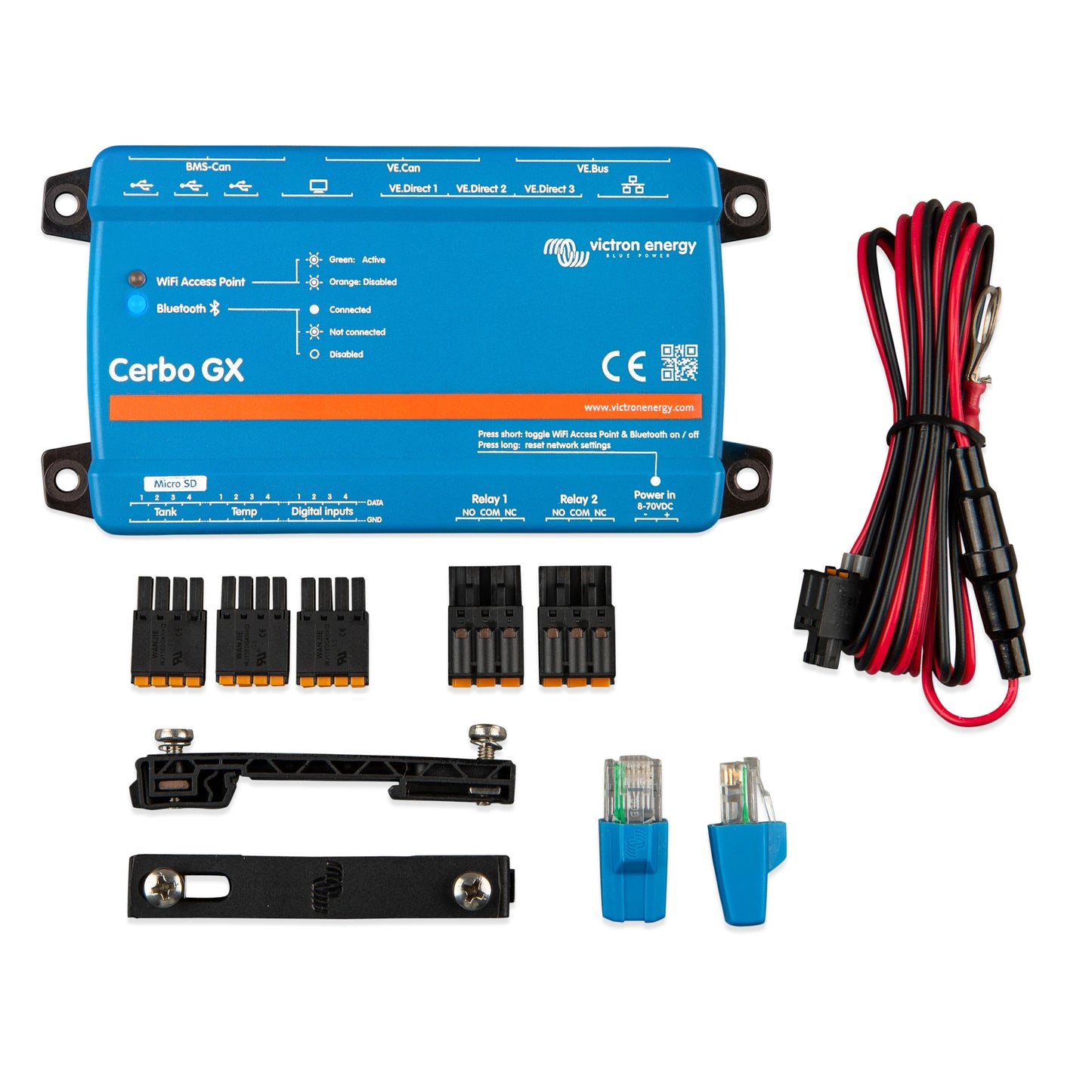
- Victron Cerbo GX MK2 communication centre
- DC power cable with inline 3.15A fuse and M8 ring terminals
- Two VE.Can terminators
- Removable terminal blocks for the I/O and relay connections
GX Touch displays, communication cables, DIN-rail adapter, temperature sensors, tank senders, cellular equipment and other accessories are sold separately.
Applications
- Off-grid homes and cabins
- RV and motorhome electrical systems
- Camper vans and vehicle conversions
- Marine and yacht power systems
- Remote communications sites
- Hybrid solar and generator installations
- Energy storage and backup power systems
- Service vehicles and mobile workstations
- Professionally monitored Victron installations
- Managed lithium battery systems
Product Specifications
| Specification | Value |
|---|---|
| Model | Cerbo GX MK2 |
| Victron Part Numbers | BPP900450110 / BPP900451100 |
| Part Number Difference | Country of origin only; both versions are functionally identical |
| Operating System | Victron Venus OS |
| Supply Voltage | 8V to 70V DC |
| Typical Power Consumption | Approximately 2.8W without GX Touch connected |
| VE.Direct Ports | 3 isolated ports; up to 15 total VE.Direct devices including supported USB connections |
| VE.Bus | 1 isolated interface with 2 paralleled RJ45 sockets |
| VE.Can | 2 independently configurable interfaces with 2 paralleled RJ45 sockets each; VE.Can 1 isolated |
| USB | 3 fully functional USB host ports |
| Ethernet | 10/100 RJ45 |
| WiFi | Built in; 2.4GHz 802.11 b/g/n with WiFi access point |
| Bluetooth | Built in; intended primarily for network configuration |
| Display Connection | HDMI and USB for optional GX Touch display |
| Storage | MicroSD card slot; maximum 32GB |
| Tank-Level Inputs | 4 resistive sender inputs |
| Temperature Inputs | 4; compatible sensors sold separately |
| Digital Inputs | 4; includes pulse-counting capability |
| Programmable Relays | 2 potential-free NO/NC relays |
| Relay Rating | 6A up to 30V DC; 1A up to 70V DC; 6A at 125V AC |
| Generator Control | Automatic or manual start/stop through Relay 1 with compatible equipment |
| Remote Monitoring | Victron VRM Portal through an available internet connection |
| Mounting | Wall mounting; 35mm DIN-rail mounting with optional adapter |
| Operating Temperature | -20°C to +50°C |
| Protection Rating | IP20 |
| Dimensions | 78 × 154 × 48mm |
| Safety Standard | IEC 62368-1 |
| Automotive Standard | ECE R10-6 |
| Warranty | 5-Year Victron Limited Warranty |
Specifications are based on the manufacturer's published data and are believed to be accurate at the time of publication. Product specifications, compatibility and supported software features may change without notice. Always verify compatibility with your equipment and refer to the current Victron documentation before installation. If you have any questions, contact us and we'll be happy to help.
Frequently Asked Questions
Does it include a screen?
No. The Cerbo GX MK2 is the communication and processing hub and does not have an integrated display. You can access it locally using a phone, tablet or computer, or add an optional GX Touch 50 or GX Touch 70 touchscreen.
The GX Touch connects directly to the Cerbo using its attached two-metre HDMI and USB cable and does not require a separate power supply. Choose the 5-inch GX Touch 50 for a compact installation or the larger 7-inch GX Touch 70 for easier viewing.
What is the difference between the two part numbers?
BPP900450110 and BPP900451100 are both Cerbo GX MK2 units with the same hardware, ports, features, firmware and system compatibility.
The separate part numbers identify different countries of manufacture. They can be used interchangeably in the same system and are covered by this single product listing.
What changed from the original Cerbo GX?
The Cerbo GX MK2 replaces the original model's VE.Can and fixed BMS-Can arrangement with two independently configurable VE.Can interfaces. VE.Can 1 is galvanically isolated, and both interfaces can be configured for supported CAN profiles.
The MK2 also has three fully functional USB host ports, pulse counting through its digital inputs and repositioned RJ45 sockets that make connected cables easier to remove.
Is VRM remote monitoring free?
Yes. The Victron VRM Portal and VRM app are available without a monitoring subscription. The Cerbo GX MK2 requires an available internet connection to communicate with VRM.
Internet service, cellular data and any required router or modem are not included with the Cerbo GX MK2.
Can it connect to SmartSolar controllers through Bluetooth?
No. The Cerbo's built-in Bluetooth is primarily used to assist with its own network setup and initial configuration. It does not collect operating data wirelessly from SmartSolar controllers or other Victron Smart products.
A SmartSolar controller normally connects to the Cerbo through VE.Direct or VE.Can, depending on the controller model. The appropriate communication cable is sold separately.
Does it replace a battery monitor?
No. The Cerbo GX MK2 displays and coordinates information supplied by connected equipment, but it does not directly measure all battery current entering or leaving the battery bank.
A compatible SmartShunt, BMV battery monitor, managed battery BMS, Lynx Shunt or another supported battery-monitoring source may be required to provide accurate battery state-of-charge information.
Can it automatically start a generator?
Yes. Relay 1 can be configured for automatic generator start and stop using conditions such as battery state of charge, battery voltage, AC load, inverter temperature, inverter overload, tank level or a periodic exercise schedule.
Direct control normally requires a generator with a compatible two-wire remote-start input. Three-wire or proprietary generator controls may require an additional interface.
Can it monitor tank levels and temperatures?
Yes. The Cerbo GX MK2 includes four resistive tank-level inputs and four temperature-sensor inputs. The readings can be viewed locally and remotely through VRM.
Tank senders and temperature sensors are not included and must be selected separately for compatibility with the Cerbo and the installation.
Can I use it without an internet connection?
Yes. The Cerbo GX MK2 can provide local monitoring and control through an optional GX Touch, its built-in WiFi access point or a local Ethernet or WiFi network without internet access.
An internet connection is required for VRM remote monitoring, off-site Remote Console access and online firmware updates.
What cables do I need?
The required cables depend on the products being connected. VE.Direct products normally require a VE.Direct cable, MultiPlus and Quattro inverter/chargers use an RJ45 VE.Bus cable, and VE.Can or compatible CAN-bus products require the appropriate CAN cable and network termination.
The Cerbo includes its fused DC power cable and two VE.Can terminators, but individual equipment communication cables are generally sold separately. Contact us with your equipment list if you would like help confirming the required connections.
What warranty does this product include?
The Cerbo GX MK2 is backed by Victron Energy's 5-year limited warranty, providing substantially longer coverage than many basic system-monitoring products.
If you need troubleshooting or warranty assistance, Sapphire Energy will work with you throughout the process.
Send us a list of your inverter/charger, solar controllers, battery monitor, battery BMS and display requirements. We'll help identify the correct communication cables and accessories needed to bring the complete system together.